DEX Pairs
Register your liquidity pool address so buy/sell tax, anti-bot, and anti-whale limits all work correctly.
Before you start
- Token owner wallet
- Your DEX pair (pool) contract address — find it on DexScreener or a block explorer
- Note: if you created liquidity on Uniswap V2 or V3 on mainnet, the pair is auto-registered at deploy time — skip to the Lookup step to verify.
Connect the token owner wallet
Connect the owner wallet. Only the token owner can register or remove DEX pair addresses.
When do you need to register manually?
You only need to manually register a DEX pair if you created liquidity on a DEX that is not auto-registered at deploy time. On Robinhood Chain mainnet, Uniswap V2 and V3 pair addresses are pre-registered automatically when your token deploys — you do not need to do anything for those. For every other DEX on mainnet (including PancakeSwap V2), and for all DEXes on testnet, you must register the pair address manually here.
Quick check: if your liquidity is on Uniswap V2 or V3 on mainnet, use the "Is DEX Pair?" lookup below first. If it already returns "Registered", you are done — no action needed.
Why registering matters
Your token contract identifies every transfer as a BUY, SELL, or wallet-to-wallet move by checking whether the sending or receiving address is a registered DEX pair. Without a registered pair, all swaps look like wallet-to-wallet moves — buy and sell tax both drop to 0%, the anti-bot window has no effect on buys, and the anti-whale max-wallet check runs against the liquidity pool itself, causing every sell to revert once the pool balance exceeds the limit. Registering the pair address fixes all three issues at once.
If your pair is not registered and you have tax enabled, no tax is collected on any swap — not even 1 basis point. The contract cannot identify buys and sells without a registered pair.
Find your DEX pair address on DexScreener
Go to dexscreener.com, search your token address, and open your token's chart. On the right panel you will see a "Pair" field with a long "0x..." address — that is the liquidity pool contract address you need to register. It is different from your token address.
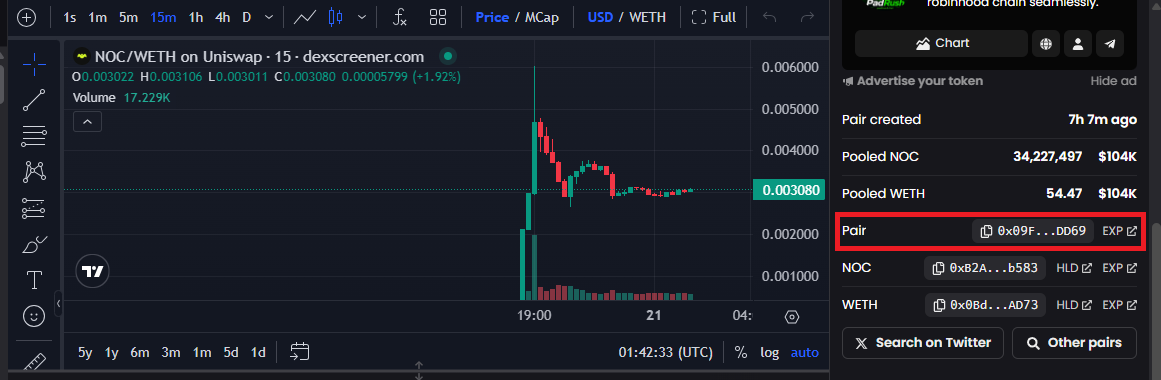
The Pair address shown in the red box is what you paste into the DEX Pairs page. It is the liquidity pool contract — not your token.
Open DexScreenerYou can also find the pair address on your block explorer. Search your token address → click the pool/pair contract shown in the "Transfers" tab.
Paste the pair address and click Register
Paste the pair address into the Pair Address field, make sure "Add Pair" is selected, and click "Register Pair". Confirm in your wallet. From that block onward, the contract correctly taxes buys and sells, enforces the anti-bot window on buys, and skips the max-wallet check for the pool itself.
Summary: which pairs are auto-registered vs manual
Mainnet — Uniswap V2 and Uniswap V3 pairs are pre-registered at deploy time: no action needed. PancakeSwap V2 and any other DEX on mainnet require manual registration here. Testnet — all pairs require manual registration regardless of which DEX you used, because the testnet factory uses a different init code hash and the pre-computed addresses do not match the actual deployed pairs.
If in doubt, use the "Is DEX Pair?" lookup at the top of the DEX Pairs page. Paste your pair address — if it says "Registered", you are already done.
What to do next
Browse all tutorials